|
Wave Watcher Series TVR-202 Troubleshooting Guide |
 |
|
Wave Watcher Series TVR-202 Troubleshooting Guide |
|
Cables and installation of cables
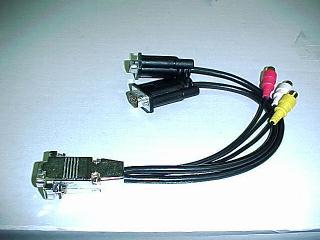 |
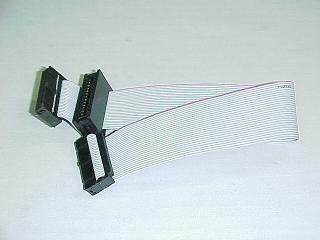 |
| Loop Back Cable | Feature Connector Cable |
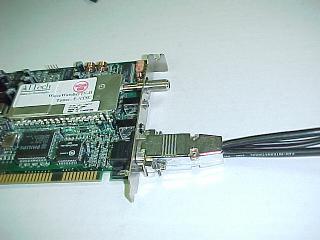 |
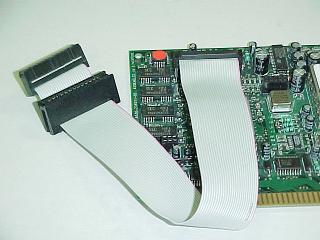 |
|
Loop Back cable installed on board |
Feature Cable installed on board |
Note that the two connectors shown above must be installed on the board correctly in order for this TV card to function properly. The Loop back cable must be installed on the TV card (not the video card) in order for proper video operation.
Some symptoms are the same and may occur for an incompatible VGA card or for one of the reasons below - note that there is also a section below for non-compatible VGA cards.
For Compatible VGA Cards-- see also TVR202 Compatibility
PINK SCREEN.
Make sure the chrome (or black Level 6.0 board) head connector on the VGA
Loopback cable is connected to the TVR-202 and not to the VGA display adapter
port (version 2.0 and 2.1).
I CAN ONLY RECEIVE 13 CHANNELS.
Open the Workshop, then Video Settings, next change the TV SYSTEM
to NTSC USA CABLE.
THE TV WINDOW HAS A PINK BORDER
AROUND IT.
Open the Workshop, then Alignment, and align
the TV image. You may need to adjust the refresh rate for the display driver.
Use the following settings as a guide: 640 x 480 @60Hz, 800 x 600 @ 56Hz, 1024 x
768 @ 72Hz. Then try aligning the image again.
BLACK SCREEN ON VGA MONITOR.
The 26-pin flat ribbon is not connected properly to the VESA Feature Connector.
Please reverse one of the connections. Note: Pin one on the TVR-202 is closest
to the metal tuner on the board, or to the right as the board is viewed from the
component side with the port side to the right.
NO SOUND.
Please check the audio connections for the TVR-202, the sound card and the
speakers. Make sure the Windows audio mixer levels are adjusted properly and the
AUX or Line-In source has been selected. No sound can also be caused by using
the 6.0 software with the 2.1 board.
VIDEO ON TOP ONLY.
For board version 2.1, open the Workshop, then Alignment, then select NORMAL.
For board version 6.0, open the Workshop, then VGA SETTINGS, then select NO.
CAN ONLY RECEIVE CHANNELS 5 AND 6.
Your cable TV provider may be transmitting a HRC cable signal.
The tuner on the TVR-202 cannot tune this type of signal. You may use a VCR or a
CABLE BOX to tune the channels.
I CANNOT SAVE MY PRESETS.
This feature was removed from the version 2.1 software.
HOW DO I CUSTOMIZE THE CHANNEL PRESETS?
With the version 2.1 software, open the TUNER.INI file in the Windows directory
and manually edit it to set the custom channel presets.
I CANNOT CAPTURE AN AVI FILE.
The TVR-202 is a single frame capture device. It cannot capture full-motion
video AVI files.
CAN THE TVR-202 BE USED FOR INTERNET VIDEO CONFERENCING?
No, the TVR-202 does not support AVI capture which is required for Internet
video conferencing programs.
I CANNOT FREEZE, THEN SAVE THE TV IMAGE.
This feature was removed from the version 2.1 software.
I CANNOT FIND THE NITESHOW PROGRAM
LISTED IN THE MANUAL.
This feature was removed from the version 6.0 software.
THE TV WINDOW COMES UP WITH A PINK
SCREEN ONLY.
This problem occurs with VRAM-based VGA display adapters.
WORKS IN 16-COLORS ONLY.
This problem occurs with VRAM-based VGA display adapters.
VIDEO ON TOP ONLY.
This problem occurs with EDO-based VGA display adapters.
I GET THE TV SCREEN IN THE WALTZ MODE ONLY.
This problem occurs with WRAM-based VGA display adapters.
MY VGA DISPLAY ADAPTER IS MISSING
THE 26-PIN VESA FEATURE CONNECTOR.
Most brand name computer systems with WRAM and VRAM-based VGA display adapters
incorporated into the motherboard do not have the 26-pin feature connector,
therefore the TVR-202 will not be compatible.
MY TVR-202 WORKED FOR THREE
MONTHS, THEN IT JUST QUIT WORKING.
This problem occurs with the version 2.1 board on a system
with a EDO-based VGA display adapter installed. There is nothing wrong with the
TVR-202 - this card is not compatible with your video card. This usually
happens when you have made some change in your system- even as simple as
installing some new software. -- see also TVR202
Compatibility
MY TVR-202 WORKS FINE BUT IT KNOCKED OUT MY MODEM.
This problem occurs on Packard Bell systems with the
all-in-one Sound/FAX/MODEM device installed. It is not compatible.
Last update 6-28-01